How to contribute
There are very strict rules on how to contribute to this codebase, even if you are from the ripmarkus organization.
Below we will list how to contribute, how NOT to contribute and why we do it like so.
Issue
- Find an issue and assign yourself to it,
- Make sure that you move it to In progress in the Kanban Board.
- Create your branch.
Branching strategy
We keep all of our code in one repository, with divergent branches for features, fixes, chores and documentation.
For example:
- chore/refactor-car-endpoint
- feat/car-endpoint
- fix/car-endpoint
- documentation/car-endpoint
Each of these will state which type of commits the branch will be.
To create a new branch, use the follow command in the cloned repo: (type = chore/refactor/feat/fix/documentation)
git checkout -b type/<branch-name>
Commits
We love commits and we love to commit every time we have added a new:
- function
- fix
- refactored line
Dont mindlessly add commits but also dont hesitate to commit.
Commits follow the same naming strategy as the branches, but in a slightly different manner.
For example:
feat: add GET endpoint for car detailsfix: resolve null pointer in car validationchore: reorganize image assetsdocs: update API documentation for cars
This convention makes it easy to scan commit history and understand what changed at a glance.
Pull Request
It is not possible to push to the main repository, neither will it be possible to review your own pull requests.
When you are done with the issue at hand, push the changes, go to the repository and select:
- Compare & pull request
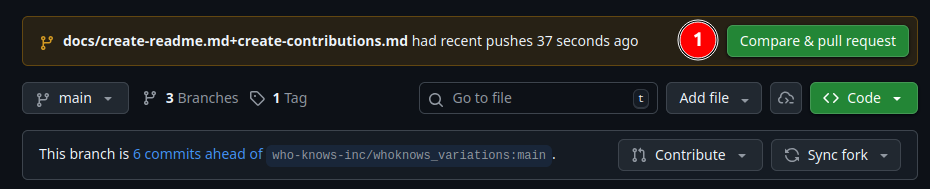
The following is extremely important, so follow the numbered list with numbers on the image closely:
1. Make sure the compare is your branch.
2. That the head repository is ripmarkus/whoknows_ripmarkus
3. Base = main
4. Base repository = ripmarkus/whoknows_ripmarkus
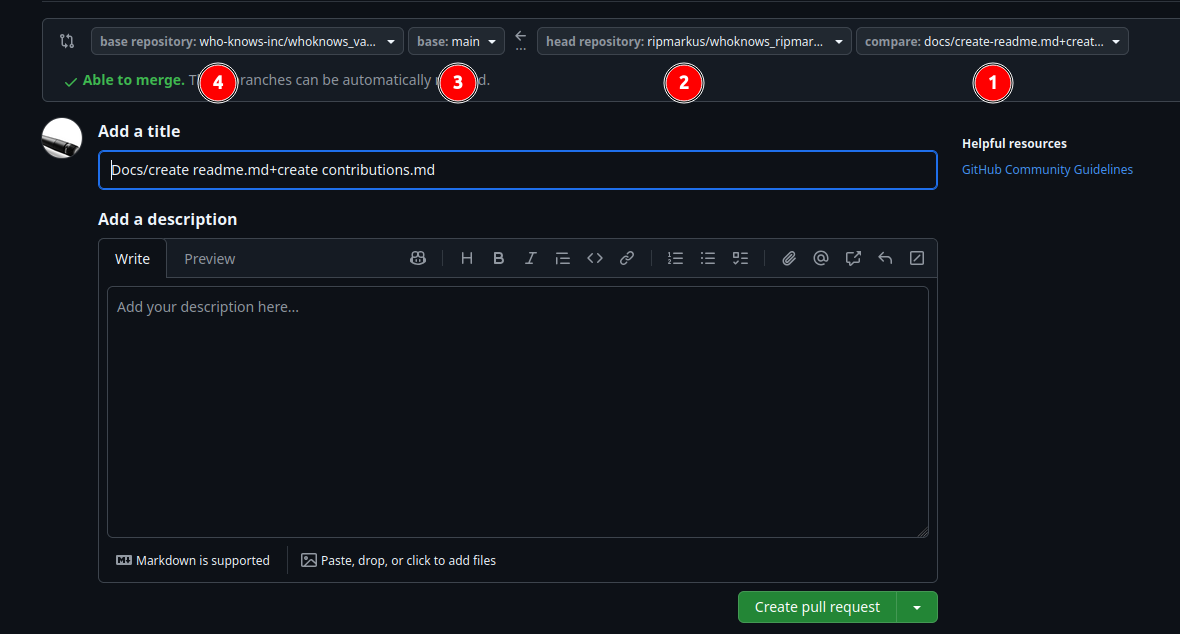
Please use the PR template when submitting pull requests. This helps maintain consistency and keeps PRs clear and concise. Thank you!
When the PR has been created, a fellow teammate will review it and merge it, if possible.
Like stated earlier, we like commits! Commit often while working on your branch. However, only open a pull request when your work is complete - we'd rather you add one more commit to your branch than have to reject an incomplete PR.
Merging PRs
//TODO: Add pictures of how to review and accepts the changes
Review the code under the commits tab.
Select review.
- Leave a comment
- Select Comment, Approve or Request Changes.
- Submit Review
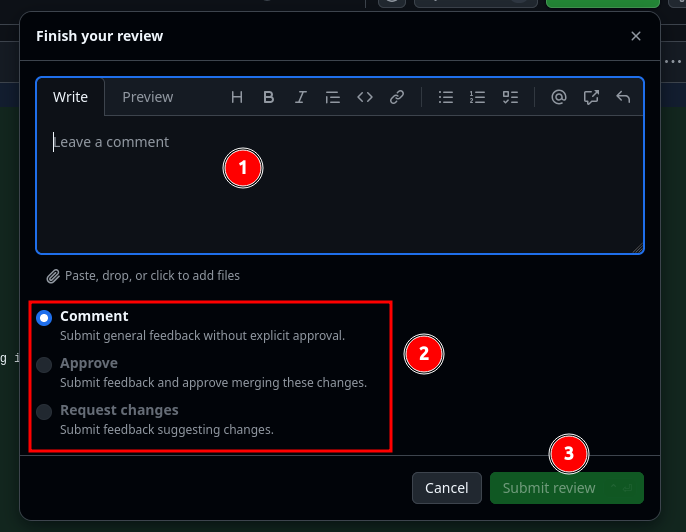
After merging, delete the feature branch to keep the repository clean.
Questions?
We like making sure everyone is onboard for this strategy, there are no stupid questions, rather ask and learn, than assume and fail.